AnyToISO Command Line
Convert an image/archive to ISO file
Syntax:  anytoiso /convert [infile] [outfile]
Example: anytoiso /convert image.uif image.iso
Extract an image/archive file
Syntax: anytoiso /extract [infile] [outfolder]
When extracting an ISO file with multiple file systems, the default file system is UDF. There's an option to specify which the file system to extract in the last /fs parameter. Possible values are iso9660, udf, xbox and hfs.
anytoiso /extract image.uif D:\image_extracted
anytoiso /extract image.iso D:\image_extracted /fs:iso9660
Create ISO from CD/DVD/Blue-ray disks
Example: anytoiso /fromcd F: image.iso
Create ISO from a local folder
Syntax: anytoiso /fromdir [infolder] [outfile] /label:<label> /fs:<fs>
It’s always better to specify a volume label for your resulting ISO. It’s also possible to specify destination file systems inside the resulting ISO file (default file systems are iso9660+joliet+udf) using the /fs parameter. Possible values are iso9660, joliet and udf.
anytoiso /fromdir D:\folder image.iso /label:MY_IMAGE /fs:iso9660+joliet
anytoiso /fromdir D:\folder image.iso /label:MY_IMAGE /fs:udf
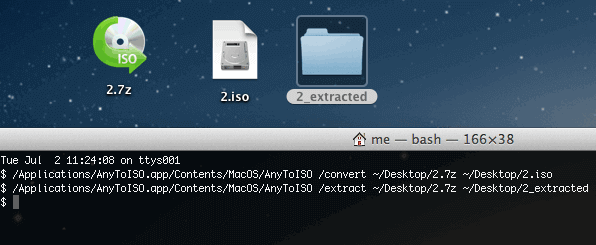
Command line usage on macOS example
Batch operation example on Windows
for /f %%f in ('dir /b *.zip') do anytoiso /convert %%f %%f.iso
Display help on command line usage
anytoiso /help